
Source code: GitHub


...and follow me on Twitter: @eriknordeus
Alright we are inching our way towards a boat. The boat can currently float, but it also has to move, so we need to add an engine and a propeller.
Adding a propeller is just a matter of adding a force where the propeller is, which will make the boat move forward. But it also has to turn. But I'm lucky because I'm modelling a boat that's propelled forward not with a propeller but with a water jet. This water jet will also steer the boat by turning the nozzle in another direction. If you have a rudder you have to find another solution!
This is how my BoatEngine script looks like (just add it to the boat you have):
using UnityEngine;
using System.Collections;

public class BoatEngine : MonoBehaviour
{
    //Drags
    public Transform waterJetTransform;

    //How fast should the engine accelerate?
    public float powerFactor;

    //What's the boat's maximum engine power?
    public float maxPower;

    //The boat's current engine power is public for debugging
    public float currentJetPower;

    private float thrustFromWaterJet = 0f;

    private Rigidbody boatRB;

    private float WaterJetRotation_Y = 0f;

    BoatController boatController;

    void Start()
	{
        boatRB = GetComponent<Rigidbody>();

        boatController = GetComponent<BoatController>();
    }


    void Update()
	{
        UserInput();
    }

    void FixedUpdate()
    {
        UpdateWaterJet();
    }

    void UserInput()
    {
        //Forward / reverse
        if (Input.GetKey(KeyCode.W))
        {
            if (boatController.CurrentSpeed < 50f && currentJetPower < maxPower)
            {
                currentJetPower += 1f * powerFactor;
            }
        }
        else
        {
            currentJetPower = 0f;
        }

        //Steer left
        if (Input.GetKey(KeyCode.A))
        {
            WaterJetRotation_Y = waterJetTransform.localEulerAngles.y + 2f;

            if (WaterJetRotation_Y > 30f && WaterJetRotation_Y < 270f)
            {
                WaterJetRotation_Y = 30f;
            }

            Vector3 newRotation = new Vector3(0f, WaterJetRotation_Y, 0f);

            waterJetTransform.localEulerAngles = newRotation;
        }
        //Steer right
        else if (Input.GetKey(KeyCode.D))
        {
            WaterJetRotation_Y = waterJetTransform.localEulerAngles.y - 2f;

            if (WaterJetRotation_Y < 330f && WaterJetRotation_Y > 90f)
            {
                WaterJetRotation_Y = 330f;
            }

            Vector3 newRotation = new Vector3(0f, WaterJetRotation_Y, 0f);

            waterJetTransform.localEulerAngles = newRotation;
        }
    }

    void UpdateWaterJet()
    {
        //Debug.Log(boatController.CurrentSpeed);

        Vector3 forceToAdd = -waterJetTransform.forward * currentJetPower;

        //Only add the force if the engine is below sea level
        float waveYPos = WaterController.current.GetWaveYPos(waterJetTransform.position, Time.time);

        if (waterJetTransform.position.y < waveYPos)
        {
            boatRB.AddForceAtPosition(forceToAdd, waterJetTransform.position);
        }
        else
        {
            boatRB.AddForceAtPosition(Vector3.zero, waterJetTransform.position);
        }
    }
}
To make the script work you have to tell it where the water jet is by giving it a gameobject. This gameobject is just an empty gameobject which is a child to the boat and its position is where the waterjet is. You can also add a box so you can see in which way the water jet is pointing.
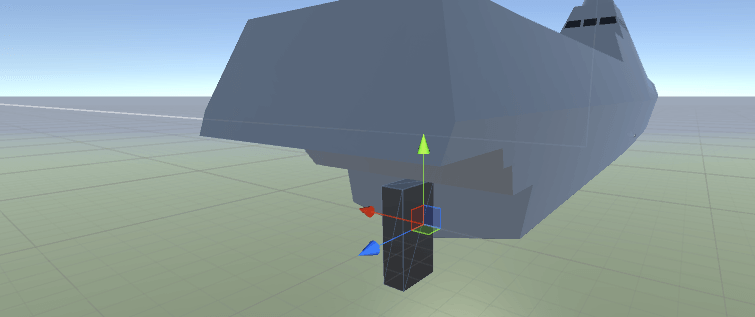
You also need a way to calculate the speed. And I've added the speed calculations to another script called BoatController.
using UnityEngine;
using System.Collections;

public class BoatController : MonoBehaviour
{
    //Speed calculations
    private float currentSpeed;
    private Vector3 lastPosition;

	void FixedUpdate()
    {
		CalculateSpeed();

        //Debug.Log(currentSpeed);
	}

	//Calculate the current speed in m/s
	private void CalculateSpeed()
    {
		//Calculate the distance of the Transform Object between the fixedupdate calls with
		//'(transform.position - lastPosition).magnitude' Now you know the 'meter per fixedupdate'
		//Divide this value by Time.deltaTime to get meter per second
		currentSpeed = (transform.position - lastPosition).magnitude / Time.deltaTime;

        //Save the position for the next update
        lastPosition = transform.position;
	}

	 public float CurrentSpeed
    {
        get
        {
            return this.currentSpeed;
        }
    }
}
And now you have your very own boat!